Quick answer: Stan Store (now often just called “Stan”) is a link-in-bio digital storefront that lets creators sell digital products, courses, memberships, and coaching calls from one mobile-friendly page. It costs $29/month (Creator) or $99/month (Creator Pro), charges 0% platform fees, and works best for creators who already have social media traffic. It is not a website builder and will not help you rank in Google.
You get one link in your Instagram or TikTok bio. Just one. But you want to sell a course, book coaching calls, collect emails, and hand out a free download. That is the problem Stan Store was built to solve.
This is an honest 2026 review. I will walk you through what Stan Store is, how it works, every feature, the real pricing (including the fees most reviews skip), who it fits, who should walk away, and how it compares to Kajabi, Podia, Skool, and others.
My 5 Years Of Experience Using Stan Store
I spend a lot of my week inside creator and SEO tools, so I went in skeptical. Stan Store shows up in so many Instagram bios that I assumed it was more hype than substance. To find out, I started a free trial and built a store from scratch.
Why I tried it. I kept seeing the same “stan.store/yourname” link under coaches, course sellers, and digital-product creators. I wanted to know if it actually replaced the messy stack of tools most creators glue together: a link page, a checkout, a booking app, and an email tool.
First impressions. Setup was genuinely fast. Within about 15 to 20 minutes I had a profile, a branding color, a social link, and my first product live. The flow asks for your niche, then walks you through adding products step by step. The store opens in a clean mobile web view, so a visitor coming from Instagram barely feels like they left the app.
What worked. Selling a simple digital download was the best part. You upload a file, set a price, edit the checkout copy, and Stan delivers the file and a confirmation email automatically. Booking a coaching call was almost as smooth. The AutoDM feature, which sends an Instagram message when someone comments a keyword, felt like a small ManyChat replacement built right in.
What felt limiting. The cracks showed when I pushed past the basics. Every store looks nearly the same, strong brand identity and graphic design services help businesses stand out in competitive markets., with little control over layout or fonts. The course builder has no quizzes or certificates. Email automation is locked behind the $99 plan, even though Stan markets itself as “all-in-one” starting at $29. And there is no way to make your store rank in Google, which matters a lot if you do not have a big audience yet.
That mix, fast and friendly but shallow once you scale, is the whole story. Let me break it down properly.
What is Stan Store? | Detailed Insights

Stan Store is an all-in-one creator store that lives in your social media link-in-bio. It lets you sell digital products, online courses, memberships, coaching calls, and lead magnets from a single page, without needing a website or any coding.
It was launched in 2020 by John Hu (now CEO), who built it with co-founder Vitalii Dodonov (CTO) after struggling to monetize his own audience without juggling a dozen tools. The platform is backed by investors including Steven Bartlett and GaryVee, and creators have earned over $400 million through it.
Think of it as “Shopify for creators,” but digital-only and far simpler. It does not sell physical products, and it does not try to be a full website. Its one job is turning followers into buyers in as few clicks as possible.
In plain terms, Stan Store is for you if: you make content on Instagram, TikTok, or YouTube, and you want a fast, clean place to sell what you know.
How Stan Store Works? | A Step-By-Step Guide

The whole model is built around social traffic. Here is the flow from start to finish:
- You create a store and add a profile photo, bio, and social links.
- You add products (a download, a course, a booking page, a membership, and so on).
- You put your stan.store/yourname link in your social bio.
- A follower taps the link and your store opens in a smooth mobile web view.
- They browse your offers, buy or book, and pay through Stripe or PayPal.
- Stan delivers the product, sends a confirmation email, and adds the money to your balance.
- You cash out to your bank from the Income tab.
Because the store opens inside a web view, the buyer feels like they never really left Instagram or TikTok. That smooth handoff is the main reason creators pick it over a plain link tool like Linktree.
Key Features Stan Store Offers To Its Users
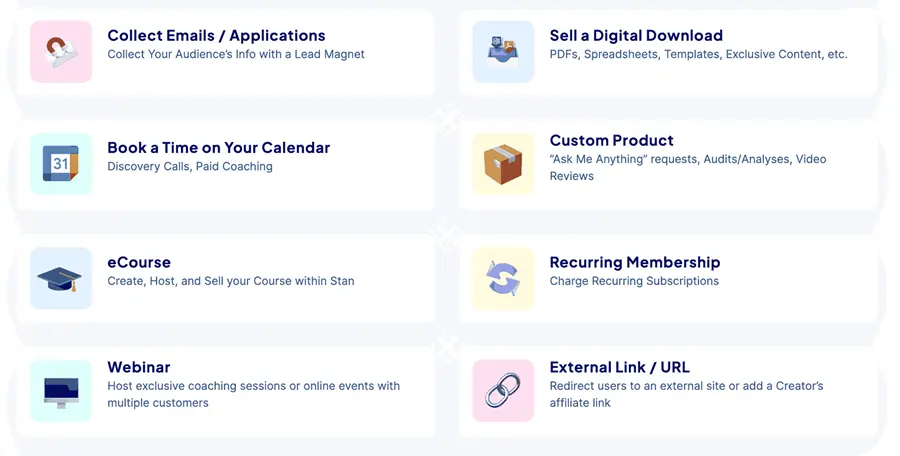
Here is what Stan Store can actually do, feature by feature.
Link-in-bio storefront. Your main page holds your photo, bio, social links, and a stack of product buttons. It is mobile-first and quick to edit. You can add your own colors and choose from a few layout styles.
Digital products. This is Stan’s strongest feature. You can sell PDFs, ebooks, Notion templates, Canva templates, checklists, guides, and audio or video files. Upload the file, set a price, edit the checkout copy, and Stan handles delivery and the confirmation email automatically. You can also add a discount price.
Course builder. Stan includes a lightweight course tool. A course has its own checkout page, a curriculum area with modules and lessons, native video hosting, and supporting files like PDFs. Learners browse through a sidebar, and the mobile player is clean. It works for simple, self-paced video courses.
Coaching calls and bookings. You can sell 1-to-1 sessions. Set your availability, call length, buffer time between meetings, and rules like “no bookings within 12 hours.” It connects to Google Meet or Zoom for the actual call.
Memberships and subscriptions. You can charge recurring monthly payments for ongoing access, like a paid community or a content library.
Community feature. Stan has a built-in community space where members post and you can sort posts into categories like “Wins” or “Questions.” It is basic, with an activity feed and light theme options.
Webinars. You can add webinar slots, set timezones and durations, and send email reminders. The webinar itself runs through Zoom or Google Meet.
Instagram AutoDM. This is a small standout. Stan can automatically send an Instagram DM when someone comments on your post or messages you a keyword. For example, someone comments “link” and they instantly get a DM with your store link. It can replace a tool like ManyChat for many creators.
Email lead capture. On every plan you can collect email sign-ups with a lead magnet. The catch: sending automated email sequences to that list is a paid upgrade (more on that below).
Other product types. Stan also supports “Ask Me Anything” custom products, external link/URL buttons, and a Stan affiliate link that pays you 20% of referred subscriptions.
Stan Store Pricing | All Plans For Sellers
Stan keeps pricing simple. There are two plans and no free plan, but there is a 14-day free trial.
| Plan | Monthly | Annual (per month) | Best for |
| Creator | $29/mo | ~$25/mo | Starting out, selling digital products and bookings |
| Creator Pro | $99/mo | ~$79/mo | Scaling, email marketing, upsells, removing branding |
What’s in the Creator plan ($29/mo): the link-in-bio store, unlimited digital products, the course builder, calendar bookings, memberships, the community feature, email lead capture, AutoDM, and webinars.
What Creator Pro adds ($99/mo):
- Email marketing (broadcasts and automated flows)
- Upsells and order bumps at checkout
- Discount codes
- Affiliate management (recruit people to sell for you)
- Payment plans (let buyers pay in installments)
- Pixel tracking (for Facebook and other ads)
- Removal of the “Stan Store” badge from your page
Quick answer – Is the $29 plan really “all-in-one”? Not quite. You can collect emails on the $29 plan, but you cannot automate them. Email flows are the most common complaint in creator communities, because Stan markets “all-in-one” at $29 while locking the email engine behind $99.
Pros and cons
| Pros | Cons |
| Fast, beginner-friendly setup (under ~20 minutes) | Not a website builder; weak landing pages |
| 0% platform transaction fees | Email automation locked behind the $99 plan |
| Smooth social-to-checkout experience | Course builder lacks quizzes, certificates, and progress tracking |
| Strong for simple digital downloads | Limited customization (most stores look alike) |
| Built-in AutoDM can replace ManyChat | Basic analytics with no customer lifetime value |
| Bookings, courses, memberships in one place | No SEO; pages cannot rank in Google |
| Trusted Stripe and PayPal checkout | The stan.store domain stays unless you pay for Pro |
| Reliable, well-reviewed support team | Single page can confuse a large catalog |
Who should use Stan Store
Stan Store is a great fit if you:
- Already have a social audience on Instagram, TikTok, or YouTube
- Sell digital products like templates, guides, ebooks, or simple courses
- Offer 1-to-1 coaching and want easy booking
- Want one clean link instead of a messy stack of tools
- Value speed and simplicity over deep design control
- Are not technical and do not want to build a website
In short: social-first creators and coaches who want to start selling fast.
Who should avoid Stan Store
Look elsewhere if you:
- Sell physical products that need inventory or shipping
- Build serious courses that need quizzes, certificates, or graded assessments
- Need a multi-page website, blog, or SEO content strategy to drive traffic. In such cases, a custom web design services gives full control over branding, pages, and customer experience.
- Want full brand control over fonts, layout, and a custom domain
- Run a large product catalog where a single page gets cluttered
- Depend on advanced email automation as the core of your funnel
If two or more of these describe you, a platform like Kajabi, Podia, Shopify, or Skool will serve you better.
Stan Store vs competitors | Comparison Table
Here is how Stan stacks up against the platforms creators compare it to most. Prices are 2026 entry tiers and can change.
| Platform | Starts at | Transaction fees | Best for | Key difference vs Stan |
| Stan Store | $29/mo | 0% (Stripe/PayPal apply) | Social-first creators selling digital products | The baseline here |
| Kajabi | ~$179/mo | 0% with Kajabi Payments | Full all-in-one course + marketing business | Far more powerful, far pricier; real website + funnels |
| Podia | ~$39/mo | Low; free plan available | Course and download sellers on a budget | Cheaper entry, includes a real website |
| Skool | ~$99/mo | None on subscription | Paid communities | Community-first with gamification Stan lacks |
| Gumroad | Free | ~10% per sale | Casual or first-time sellers | No monthly fee, but high per-sale cut |
| Linktree | $0–$50/mo | Varies | Pure link-in-bio | Just links; not a real store |
The short version: Stan sits between a simple link tool (Linktree) and a heavy all-in-one (Kajabi). If you want speed and a low fixed cost, Stan wins. If you want depth, a website, and advanced marketing, you pay more elsewhere.
Setup Process | Step by Step Guide
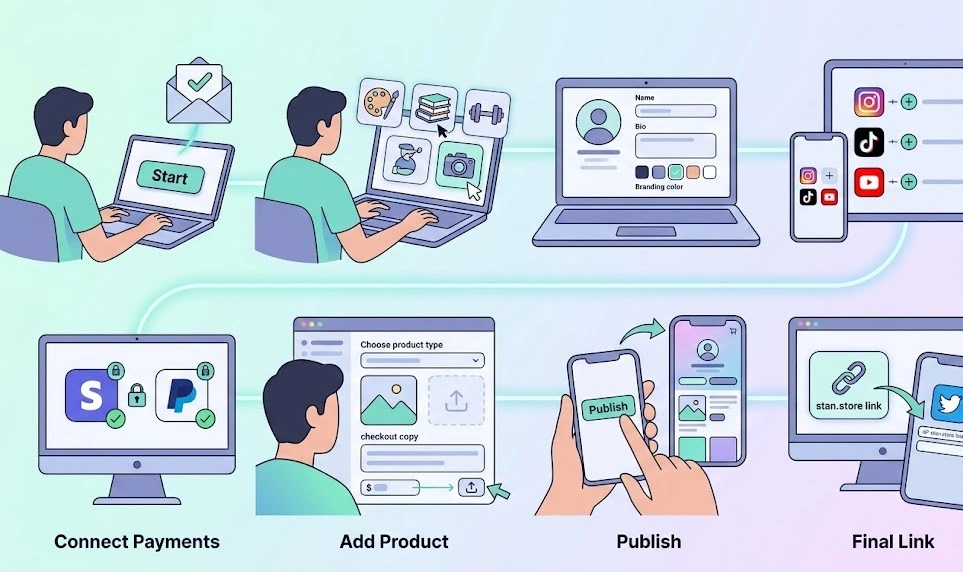
Getting started is genuinely quick. Here is the path:
- Start your free trial and verify your email.
- Pick your niche when prompted (it tailors a few suggestions).
- Set up your profile: photo, name, bio, and a branding color.
- Add social links like Instagram, TikTok, and YouTube.
- Connect Stripe (and PayPal if you want it) for payments.
- Add your first product: choose a type, add a thumbnail, write the checkout copy, set a price, and upload your file.
- Hit publish. Your product appears on your store and in your bio list.
- Copy your stan.store link and paste it into your social bios.
Most people finish a basic store in well under half an hour.
Quick answer – How long does setup take? Around 15 to 20 minutes for a basic store, including your first product. No coding or design skills needed.
Customization options
This is where Stan is deliberately simple, for better and worse.
You can change your colors, pick from a handful of fonts, choose between a few page layout styles, reorder buttons, and edit checkout copy. You cannot freely rearrange every block, build complex multi-section pages, or apply deep branding.
The result is that most Stan stores look similar. For beginners, that is a feature, not a bug. It removes the overwhelm of design and keeps pages clean and high-converting. For established brands with strong visual identity, it can feel restrictive. If pixel-perfect design control matters to you, Stan will frustrate you.
Payment and integrations
Payments run through Stripe and PayPal. Stan itself takes 0%, but the processors charge their standard fees (full breakdown in the next section).
Payouts are in your control. Open the Income tab, check your available balance, and press Cash Out to transfer to your bank. Funds typically land the next weekday morning.
Integrations include:
- Stripe and PayPal for checkout
- Google Meet and Zoom for calls and webinars (note: Zoom integration is limited in some European regions, where Google Calendar is used instead)
- Mailchimp natively for email sign-ups
- Zapier to connect hundreds of other tools, including email providers like Kit (ConvertKit)
So if you already use an outside email tool, you can pipe Stan sign-ups straight into it.
SEO and discoverability
This section matters most, and most reviews skip it. Stan Store is not built for SEO, If you want long-term growth, investing in professional SEO services in Los Angeles helps you rank on Google and attract consistent organic traffic. Your store pages are not designed to rank in Google, and the landing-page builder is very limited. Stan is built for traffic you already have on social media, not traffic you earn from search.
Many creators design a full landing page in Canva and upload it to Stan as an image. It looks polished, but an image cannot be read by search engines, so it is invisible in Google. A slightly better option is mixing formatted text with images, which is at least readable.
The takeaway: if your growth plan depends on getting found in search, Stan alone will not get you there. Pair it with a real website or content strategy, and use Stan as the checkout layer for your social audience.
Real limitations most reviews ignore while using Stan Store
Beyond the obvious cons, these quieter limits trip people up:
- You cannot hide a product from your bio list. Once you publish a product, it shows on your public store. Creators who want a “secret” offer often build a separate link page on their own site.
- No custom domain. Even Creator Pro only removes the badge; you do not get a true branded domain like a website would offer.
- The refund fee gotcha. When you refund a buyer, Stripe keeps its processing fee. You refund the full amount, but you do not get that fee back.
- Course gaps for serious educators. No quizzes, no certificates, no graded assessments, and no lesson comments. Fine for simple video courses, not for structured programs.
- No evergreen or live webinars. There is no built-in live streaming and no “play a recording as live” option. You lean on Zoom or Google Meet.
- Community has no gamification. No points, no levels, no leaderboards. Dedicated tools like Skool or Circle do this better.
Performance, analytics, and Support
Performance. The stores load fast and feel smooth on mobile, which is exactly where most buyers are. The seamless social-to-checkout handoff is a real strength.
Analytics. This is a weak spot. The dashboard shows daily click-throughs, product sales, sign-ups, and bookings, which is enough for beginners. But it is too shallow for scaling. You cannot easily track a customer’s lifetime value or see which traffic source drives the most profit. Serious sellers will want more.
Support. Stan’s support team earns consistent praise. Reviewers describe quick, human replies and real help with issues like Stripe verification. That reliability is part of why the platform holds a strong reputation.
Is Stan Store safe and legit?
Yes. Stan Store is a legitimate, established platform.
- It launched in 2020 and is run by founder John Hu (CEO) and Vitalii Dodonov (CTO).
- It holds an “Excellent” 4.8 out of 5 rating on Trustpilot across roughly 1,900 reviews.
- Creators have earned over $400 million through it.
- It uses Stripe and PayPal, two of the most trusted payment processors in the world.
- It is backed by well-known investors, including Steven Bartlett and GaryVee.
“Legit” does not mean “right for everyone,” though. At $29/month minimum with no free plan, it is a real commitment. Use the 14-day trial to test it before you pay.
My final verdict
Stan Store does exactly what it promises, and it does it with almost no friction. If you are a social-first creator selling digital products, simple courses, or coaching, the $29 Creator plan is excellent value. The fast setup, 0% platform fees, and built-in AutoDM make it easy to start earning from your audience quickly.
But it is not the do-everything platform its marketing suggests. The $99 Creator Pro plan is a steep jump, and you will likely need it sooner than you think, because email automation, upsells, and badge removal all live there. If you need a real website, full website development + SEO, advanced courses, or deep design control, you will outgrow Stan and should look at Kajabi, Podia, or Shopify instead.
Bottom line: Stan is the fastest, simplest way to turn a social following into sales. Start on Creator, test it for 14 days, and only move to Pro when your sales justify it.
Key takeaways
- Stan Store is a link-in-bio digital storefront for creators, built for social traffic.
- Pricing: $29/mo Creator or $99/mo Creator Pro, with 0% platform fees but Stripe/PayPal processing fees.
- Best for digital products, simple courses, coaching, and memberships.
- Weak on SEO, design control, advanced courses, and analytics.
- Email automation, upsells, and branding removal require the $99 plan.
- It is legit (Trustpilot 4.8/5, $400M+ creator earnings) but commit only after the free trial.
FAQs
What is Stan Store used for? Stan Store is used to sell digital products, courses, memberships, and coaching calls from a single link in your social media bio. It turns followers into buyers without needing a website.
How much does Stan Store cost in 2026? It costs $29/month for the Creator plan or $99/month for Creator Pro. Annual billing drops these to roughly $25 and $79 per month. There is a 14-day free trial and no permanent free plan.
Does Stan Store charge transaction fees? Stan charges 0% platform fees. But payment processors do: Stripe is about 2.9% + $0.30 per US sale (more for international), and PayPal is about 3.49% plus a fixed fee. A small payout fee also applies.
Can you build a course on Stan Store? Yes, but it is basic. You get modules, lessons, video hosting, and downloads. You do not get quizzes, certificates, progress tracking, or lesson comments. For structured programs, use Kajabi, Teachable, or Thinkific.
Is Stan Store better than Linktree? They do different jobs. Linktree is a list of links that send visitors away. Stan is a full store that keeps visitors on a checkout experience. For selling, Stan is far more capable; for simple links, Linktree is cheaper.
Does Stan Store have email marketing? You can collect email sign-ups on every plan, but automated email flows and broadcasts require the $99 Creator Pro plan.
Can Stan Store replace a website? No. Stan’s link-in-bio builder is not a website or a true landing-page builder, and its pages do not rank in Google. Many creators keep a separate website for SEO and use Stan as their checkout.
Is Stan Store legit and safe? Yes. It launched in 2020, holds a 4.8/5 Trustpilot rating, has processed hundreds of millions in creator earnings, and uses Stripe and PayPal for payments.
How long does it take to get paid? You cash out from the Income tab, and funds typically reach your bank the next weekday morning.
Who should not use Stan Store? Anyone selling physical products, running certificate-based courses, needing SEO traffic, or wanting full design control. Those creators are better served by Shopify, Kajabi, or Podia.